Provider configuration | Configuration files
The server enables to upload static configuration files. Static configuration files help initialize or update boruta resources from YAML.
YAML configuration files
Configuration files must use version: "1.0" and a configuration object. Each resource section is optional. Sections expecting multiple resources are arrays.
---
version: "1.0"
configuration:
  node_name: "test"
  aliases: ["test.local"]
  cluster_ca:
    certificate: |
      -----BEGIN CERTIFICATE-----
      [...]
      -----END CERTIFICATE-----
    private_key: |
      -----BEGIN PRIVATE KEY-----
      [...]
      -----END PRIVATE KEY-----
  gateway:
  - [...]
  microgateway:
  - [...]
  backend:
  - [...]
  identity_provider:
  - [...]
  client:
  - [...]
  role:
  - [...]
  scope:
  - [...]
  error_template:
  - [...]
  organization:
  - [...]
Resources are upserted when possible. Most resources are looked up by id first, then by name when the resource supports it. Upstreams are looked up by node_name, virtual_host, host, port, and uris.
Node identity
node_name identifies the current boruta node for service registry and microgateway configuration. aliases adds extra names to the service registry record, in addition to the node hostname.
---
version: "1.0"
configuration:
  node_name: "orders-node"
  aliases: ["orders.internal", "orders.local"]
cluster_ca
cluster_ca configures the service registry root certificate authority. The certificate and private key must be a valid pair.
---
version: "1.0"
configuration:
  cluster_ca:
    certificate: |
      -----BEGIN CERTIFICATE-----
      [...]
      -----END CERTIFICATE-----
    private_key: |
      -----BEGIN PRIVATE KEY-----
      [...]
      -----END PRIVATE KEY-----
gateway
gateway configures upstreams for the global gateway entrypoint. Required fields are scheme, host, port, and uris.
---
version: "1.0"
configuration:
  gateway:
    - authorize: true
      virtual_host: "api.example.com"
      scheme: "https"
      host: "api.example.com"
      port: 443
      uris: ["/api"]
      strip_uri: true
      authorize: true
      required_scopes:
        GET: ["api:read"]
        POST: ["api:write"]
      forwarded_token_signature_alg: "HS256"
      forwarded_token_secret: "secret"
      error_content_type: "application/json"
      unauthorized_response: |
        {"error":"unauthorized"}
      forbidden_response: |
        {"error":"forbidden"}
microgateway
microgateway configures upstreams for a service registry node sidecar gateway. In files loaded by the administration application, node_name is set to the current node name while loading.
---
version: "1.0"
configuration:
  node_name: "orders-node"
  microgateway:
    - authorize: true
      scheme: "https"
      host: "orders.internal"
      port: 8443
      uris: ["/orders"]
      strip_uri: true
      mtls_enabled: true
      required_scopes:
        GET: ["orders:read"]
        POST: ["orders:write"]
organization
organization creates or updates organizations. name is required.
---
version: "1.0"
configuration:
  organization:
    - id: "00000000-0000-0000-0000-000000000010"
      name: "default"
      label: "Default organization"
backend
backend creates or updates identity backends. It supports the same configuration families as the backend administration pages: type, email, identity federation, verifiable credentials, and user metadata.
---
version: "1.0"
configuration:
  backend:
    - id: "00000000-0000-0000-0000-000000000001"
      name: "Example backend"
      is_default: true
      type: "Elixir.BorutaIdentity.IdentityProviders.Backend.Ecto"
      create_default_organization: true
      roles:
        - id: "00000000-0000-0000-0000-000000000020"
      smtp_from: "no-reply@example.com"
      smtp_relay: "smtp.example.com"
      smtp_port: 587
      smtp_username: "smtp-user"
      smtp_password: "smtp-password"
      smtp_tls: "always"
      smtp_ssl: false
      federated_servers:
        - name: "external-idp"
          client_id: "federated-client"
          client_secret: "federated-secret"
          base_url: "https://accounts.example.com"
          discovery_path: "/.well-known/openid-configuration"
          scope: "openid profile email"
          federated_attributes: "email name"
      metadata_fields:
        - attribute_name: "department"
          user_editable: true
          scopes: ["profile"]
      verifiable_credentials:
        - version: "1"
          credential_identifier: "BorutaCredential"
          time_to_live: 3600
          format: "jwt_vc"
          types: "VerifiableCredential BorutaCredential"
          claims:
            - name: "email"
              label: "Email"
              pointer: "email"
          display:
            name: "Boruta credential"
            locale: "en"
            background_color: "#ffffff"
            text_color: "#000000"
            logo:
              url: "https://example.com/logo.png"
              alt_text: "Example logo"
      verifiable_presentations:
        - presentation_identifier: "BorutaCredential"
          presentation_definition: |
            {
              "id": "boruta-credential",
              "input_descriptors": []
            }
identity_provider
identity_provider creates or updates identity providers. Use backend_id to attach the identity provider to a backend.
---
version: "1.0"
configuration:
  identity_provider:
    - id: "00000000-0000-0000-0000-000000000002"
      name: "Example identity provider"
      backend_id: "00000000-0000-0000-0000-000000000001"
      consentable: true
      choose_session: true
      registrable: true
      confirmable: true
      totpable: true
      enforce_totp: false
      user_editable: true
      templates:
        - type: "layout"
          content: "<html>{{ content }}</html>"
        - type: "login"
          content: "<form>[...]</form>"
client
client creates or updates OAuth clients. Use identity_provider.id to bind the client to an identity provider.
---
version: "1.0"
configuration:
  client:
    - id: "00000000-0000-0000-0000-000000000003"
      name: "Example client"
      secret: "secret"
      confidential: true
      public_client_id: "https://client.example.com"
      check_public_client_id: true
      identity_provider:
        id: "00000000-0000-0000-0000-000000000002"
      redirect_uris:
        - "https://client.example.com/callback"
      authorized_resources:
        - "https://api.example.com"
      supported_grant_types:
        - "authorization_code"
        - "client_credentials"
        - "refresh_token"
      token_endpoint_auth_methods:
        - "client_secret_basic"
      authorized_scopes:
        - name: "profile"
      authorize_scope: true
      pkce: true
      public_refresh_token: false
      public_revoke: false
      enforce_dpop: false
      enforce_tx_code: false
      access_token_ttl: 3600
      refresh_token_ttl: 86400
      authorization_code_ttl: 60
      authorization_request_ttl: 600
      id_token_ttl: 3600
      id_token_signature_alg: "HS256"
      token_endpoint_jwt_auth_alg: "HS256"
      userinfo_signed_response_alg: "HS256"
      jwks_uri: "https://client.example.com/.well-known/jwks.json"
      id_token_kid: "client-key"
      logo_uri: "https://client.example.com/logo.png"
      response_mode: "post"
      metadata:
        application_type: "web"
scope
scope creates or updates OAuth scopes.
---
version: "1.0"
configuration:
  scope:
    - id: "00000000-0000-0000-0000-000000000004"
      name: "profile"
      label: "Profile"
      public: true
    - id: "00000000-0000-0000-0000-000000000005"
      name: "api:write"
      label: "Write API data"
      public: false
role
role creates or updates roles and assigns scopes by id.
---
version: "1.0"
configuration:
  scope:
    - id: "00000000-0000-0000-0000-000000000004"
      name: "profile"
      label: "Profile"
      public: true
    - id: "00000000-0000-0000-0000-000000000005"
      name: "api:write"
      label: "Write API data"
      public: false
  role:
    - id: "00000000-0000-0000-0000-000000000020"
      name: "administrator"
      scopes:
        - id: "00000000-0000-0000-0000-000000000004"
        - id: "00000000-0000-0000-0000-000000000005"
error_template
error_template updates an existing error template by numeric type. The referenced template type must already exist.
---
version: "1.0"
configuration:
  error_template:
    - type: "400"
      content: |
        {"error":"bad_request","message":"{{ reason.message }}"}
    - type: "403"
      content: |
        {"error":"forbidden","message":"{{ reason.message }}"}
    - type: "404"
      content: |
        {"error":"not_found","message":"{{ reason.message }}"}
    - type: "500"
      content: |
        {"error":"server_error","message":"{{ reason.message }}"}
Command line loader
Static configuration can be loaded from a release command with eval. The command reads the configuration path from the corresponding environment variable.
Use the full administration loader when the file contains identity, OAuth, administration, service registry, and gateway resources such as backend, identity_provider, client, scope, role, error_template, organization, cluster_ca, gateway, or microgateway.
BORUTA_CONFIGURATION_PATH=/etc/boruta/configuration.yml \
  ./bin/boruta eval "BorutaAdmin.Release.load_configuration()"
When using the split administration release, use the boruta_admin executable.
BORUTA_CONFIGURATION_PATH=/etc/boruta/configuration.yml \
  ./bin/boruta_admin eval "BorutaAdmin.Release.load_configuration()"
Use the gateway loader when the file only configures gateway upstreams with gateway and microgateway sections.
BORUTA_GATEWAY_CONFIGURATION_PATH=/etc/boruta/gateway.yml \
  ./bin/boruta_gateway eval "BorutaGateway.Release.load_configuration()"
For a full release, the gateway loader can also be called from the boruta executable.
BORUTA_GATEWAY_CONFIGURATION_PATH=/etc/boruta/gateway.yml \
  ./bin/boruta eval "BorutaGateway.Release.load_configuration()"
The gateway application also loads BORUTA_GATEWAY_CONFIGURATION_PATH during startup when the path points to an existing file.
Manage through User Interface
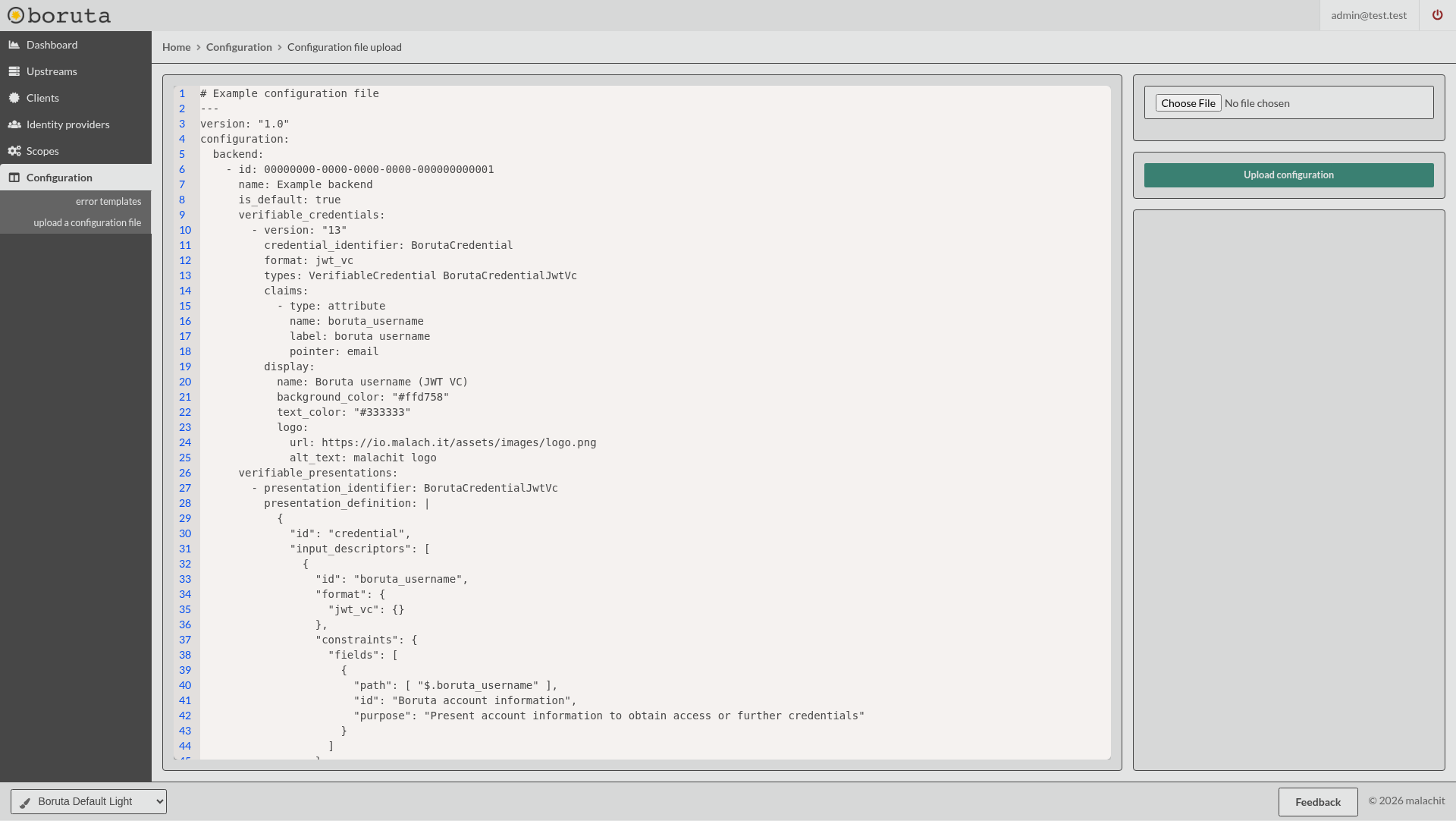
The Administration interface gives the ability to upload a static configuration file from the Configuration > upload a configuration file section in the sidebar menu.
Manage through API
Static configuration file operations are accessible through a REST API. The endpoints are protected with a Bearer token that can be obtained with any OAuth flow. In order to get access, you need to have an access token with the private scope configuration:manage:all granted.
Have a look at the API documentation