(WIP) Tokens dashboard
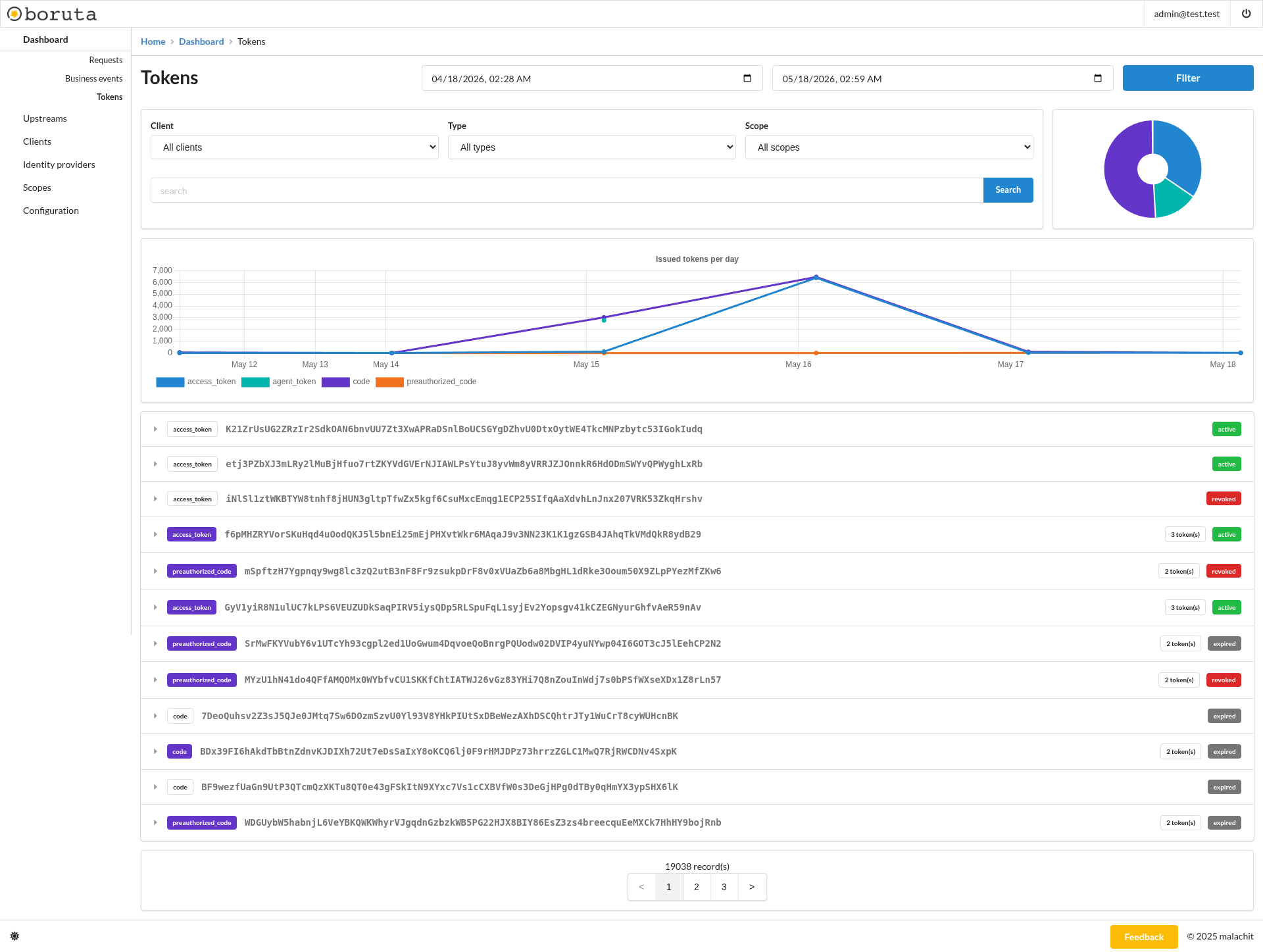
The tokens dashboard helps monitor tokens and authorization artifacts issued by boruta from the administration interface. It gives administrators a detailed view of issued access tokens, authorization codes, pre-authorized codes, and related records. This dashboard is useful to inspect token volume, token type distribution, granted scopes, lifecycle status, and relationships between artifacts created during OAuth 2.0, OpenID Connect, and Verifiable Credential flows.
Purpose
This dashboard is intended to inspect issued authorization artifacts and their lifecycle. It helps answer questions such as:
- Which clients received tokens?
- Which token types were issued during a period?
- Which scopes were granted?
- Which records are active, revoked, or expired?
- Which tokens are linked to an authorization code or pre-authorized code?
It is useful when validating OAuth 2.0, OpenID Connect, or Verifiable Credential flows where several related artifacts can be issued during one user or client interaction.
Filters
The dashboard can be filtered by:
- Date range - restricts displayed metrics and records to the selected time window.
- Client - focuses the dashboard on tokens related to one client.
- Type - filters records by token type, such as
access_token,agent_token,code, orpreauthorized_code. - Scope - filters issued tokens by granted scope.
- Search - searches token records by their displayed value.
Triggering the Filter button refreshes the charts and token list according to the selected values. Triggering Search applies the text search on the filtered token records.
When investigating a specific client flow, start by selecting the client and date range. Then narrow the result with the token type, scope, or search field.
Metrics
The token type chart shows the distribution of matching records by type. It helps understand which authorization artifacts are being issued during the selected period.
The issued tokens per day chart displays the number of issued records grouped by day and token type. It helps identify issuance peaks and compare token families over time.
Reading the charts
The token type distribution helps identify the shape of the selected flows. For example, authorization code flows should produce authorization codes and access tokens, while pre-authorized credential flows can involve pre-authorized codes.
The issued tokens per day chart is useful to detect issuance peaks, compare token families, and validate that expected artifacts are created after a configuration or integration change.
Token list
The token list displays matching records with their type, token value, lifecycle status, and related token count when a record is linked to other tokens. Status badges help distinguish active, revoked, and expired records.
Rows can be expanded to inspect more details about a token record and its relationships.
The related token count helps follow chains of artifacts. For example, an authorization code can be related to tokens produced after it is exchanged. Expanding records makes those relationships easier to inspect during debugging.
Lifecycle states
Token status badges expose the current lifecycle state:
- Active - the token or artifact can still be used according to its type and configuration.
- Revoked - the token has been explicitly invalidated and should no longer be accepted.
- Expired - the token reached the end of its validity period.
When validating access problems, the lifecycle state should be checked together with the client, scope, and related token information.
Investigation workflow
- Select the time window where the token should have been issued.
- Filter by client and, when known, by token type or scope.
- Use search when you have a token value or authorization artifact value.
- Check the status badge to confirm whether the record is active, revoked, or expired.
- Expand related records to inspect the complete chain of issued artifacts.
Navigation
- HTTP traffic monitoring - Requests dashboard
- Business events monitoring - Business events dashboard